Showing posts with label 19c. Show all posts

April 17, 2025

Increase parallel worker in expdp/impdp runtime

How to increase the value if the job is running for long time?

select OWNER_NAME,JOB_NAME,STATE from  DBA_DATAPUMP_JOBS;

make a note of the job name, which is in executing state and then run the below command

$expdp system/********** attach=SYS_EXPORT_FULL_01

OR

$impdp system/********** attach=SYS_IMPORT_FULL_01

This will open the interactive session for the datapump utility and you can execute the below commands:

> status

> parallel=4 (whichever value you have determined to provide)

And now run status again and it will show that 4 workers have been assigned to the job.


Hope this helps. Best Wishes!!

April 15, 2025

Oracle DB NLS Characterset Conversion

How to Convert NLS Character set in Oracle:

In this article, I will be converting character set of a 19c oracle database from WE8MSWIN1252 to AL32UTF8

Steps to be followed:

Prerequisites:

Run the below query and keep record of the existing information.

select value from NLS_DATABASE_PARAMETERS where Parameter='NLS_CHARACTERSET';

SELECT VALUE FROM NLS_DATABASE_PARAMETERS WHERE PARAMETER='NLS_NCHAR_CHARACTERSET';

select * from v$nls_parameters where parameter like '%CHARACTERSET';

select userenv('language') from dual;

For my example this is the output:

SQL> select value from NLS_DATABASE_PARAMETERS where Parameter='NLS_CHARACTERSET';

VALUE
----------------------------------------------------------------
WE8MSWIN1252

SQL> SELECT VALUE FROM NLS_DATABASE_PARAMETERS WHERE PARAMETER='NLS_NCHAR_CHARACTERSET';

VALUE
----------------------------------------------------------------
AL16UTF16

SQL> select * from v$nls_parameters where parameter like '%CHARACTERSET';

PARAMETER
----------------------------------------------------------------
VALUE                                                                CON_ID
---------------------------------------------------------------- ----------
NLS_CHARACTERSET
WE8MSWIN1252                                                              0

NLS_NCHAR_CHARACTERSET
AL16UTF16                                                                 0


SQL> select userenv('language') from dual;

USERENV('LANGUAGE')
----------------------------------------------------
AMERICAN_AMERICA.WE8MSWIN1252


Now run the below query to see the datatype it is using:

select distinct(nls_charset_name(charsetid)) CHARACTERSET,
decode(type#, 1, decode(charsetform, 1, 'VARCHAR2', 2, 'NVARCHAR2','UNKOWN'),
decode(charsetform, 1, 'VARCHAR', 2, 'NCHAR VARYING', 'UNKOWN'),
decode(charsetform, 1, 'CHAR', 2, 'NCHAR', 'UNKOWN'),
decode(charsetform, 1, 'CLOB', 2, 'NCLOB', 'UNKOWN')) TYPES_USED_IN
from sys.col$
where charsetform in (1,2)
and type# in (1, 9, 96, 112)
order by CHARACTERSET;

Example output:

SQL> select distinct(nls_charset_name(charsetid)) CHARACTERSET,
  2  decode(type#, 1, decode(charsetform, 1, 'VARCHAR2', 2, 'NVARCHAR2','UNKOWN'),
  3  9, decode(charsetform, 1, 'VARCHAR', 2, 'NCHAR VARYING', 'UNKOWN'),
  4  96, decode(charsetform, 1, 'CHAR', 2, 'NCHAR', 'UNKOWN'),
112, decode(charsetform, 1, 'CLOB', 2, 'NCLOB', 'UNKOWN')) TYPES_USED_IN
from sys.col$ where charsetform in (1,2) and type# in (1, 9, 96, 112) order by CHARACTERSET;  5    6

CHARACTERSET                             TYPES_USED_IN
---------------------------------------- -------------
AL16UTF16                                NCHAR
AL16UTF16                                NCLOB
AL16UTF16                                NVARCHAR2
WE8MSWIN1252                             CHAR
WE8MSWIN1252                             CLOB
WE8MSWIN1252                             VARCHAR2

6 rows selected.


Now check the Database Size:

col "Database Size" format a20
col "Free space" format a20
col "Used space" format a20

select round(sum(used.bytes) / 1024 / 1024 / 1024 ) || ' GB' "Database Size"
, round(sum(used.bytes) / 1024 / 1024 / 1024 ) -
round(free.p / 1024 / 1024 / 1024) || ' GB' "Used space"
, round(free.p / 1024 / 1024 / 1024) || ' GB' "Free space"
from (select bytes
from v$datafile
union all
select bytes
from v$tempfile
union all
select bytes
from v$log) used
, (select sum(bytes) as p
from dba_free_space) free
group by free.p
/


Backup:

Take a full backup of the database. Either through RMAN or Expdp, depending on the db size and your database setup.


For RMAN: follow this link

For EXPDP : follow this link

Once the backup is done, check there are ample archive space available. 

If you would like, you can create a restore point for easy revert back of the change.

create restore point pre_charset guarantee flashback database;

Check the restore point is created or not.

set lines 400
set pages 300
col name for a20
col time for a40

SELECT NAME, SCN, TIME, DATABASE_INCARNATION#,
GUARANTEE_FLASHBACK_DATABASE,STORAGE_SIZE
FROM V$RESTORE_POINT
where GUARANTEE_FLASHBACK_DATABASE='YES';


check Invalid count:

select count(*) from dba_objects where status='INVALID';

Invalid object count schema wise:

set pages 300
set lines 300
col owner for a30

select owner, count(*) from dba_objects where status='INVALID' group by owner;

If there are numerous invalid count, run utlrp.sql to recompile the invalid objects:


SQL>@?/rdbms/admin/utlrp.sql

Change the character set:

Now follow the below steps to convert the characterset:
--Proceed to alter the database
sqlplus / as sysdba
shutdown immediate

startup Restrict

SQL> sho parameter  job_queue_processes

NAME                                 TYPE        VALUE
------------------------------------ ----------- ------------------------------
job_queue_processes                  integer     160
SQL> show parameter aq_tm_processes;

NAME                                 TYPE        VALUE
------------------------------------ ----------- ------------------------------
aq_tm_processes                      integer     1


SQL> ALTER SYSTEM SET JOB_QUEUE_PROCESSES=0;

System altered.

SQL> ALTER SYSTEM SET AQ_TM_PROCESSES=0;

System altered.


ALTER DATABASE CHARACTER SET INTERNAL_USE AL32UTF8;


ALTER SYSTEM DISABLE RESTRICTED SESSION;
-- After changing the character set bounce the database
shutdown immediate
startup

ALTER SYSTEM SET JOB_QUEUE_PROCESSES=160;
ALTER SYSTEM SET AQ_TM_PROCESSES=1;

Now check for the character set again to validate the change is successful:

Query:

select distinct(nls_charset_name(charsetid)) CHARACTERSET,
decode(type#, 1, decode(charsetform, 1, 'VARCHAR2', 2, 'NVARCHAR2','UNKOWN'),
decode(charsetform, 1, 'VARCHAR', 2, 'NCHAR VARYING', 'UNKOWN'),
decode(charsetform, 1, 'CHAR', 2, 'NCHAR', 'UNKOWN'),
decode(charsetform, 1, 'CLOB', 2, 'NCLOB', 'UNKOWN')) TYPES_USED_IN
from sys.col$
where charsetform in (1,2)
and type# in (1, 9, 96, 112)
order by CHARACTERSET;

Example:


SQL> select distinct(nls_charset_name(charsetid)) CHARACTERSET,
  2  decode(type#, 1, decode(charsetform, 1, 'VARCHAR2', 2, 'NVARCHAR2','UNKOWN'),
  3  9, decode(charsetform, 1, 'VARCHAR', 2, 'NCHAR VARYING', 'UNKOWN'),
  4  96, decode(charsetform, 1, 'CHAR', 2, 'NCHAR', 'UNKOWN'),
112, decode(charsetform, 1, 'CLOB', 2, 'NCLOB', 'UNKOWN')) TYPES_USED_IN
  5    6  from sys.col$ where charsetform in (1,2) and type# in (1, 9, 96, 112) order by CHARACTERSET;

CHARACTERSET                             TYPES_USED_IN
---------------------------------------- -------------
AL16UTF16                                NCHAR
AL16UTF16                                NCLOB
AL16UTF16                                NVARCHAR2
AL32UTF8                                 CHAR
AL32UTF8                                 CLOB
AL32UTF8                                 VARCHAR2

6 rows selected.


check invalid Count:

select count(*) from dba_objects where status='INVALID';

Invalid Count schema wise:

set pages 300
set lines 300
col owner for a30

select owner, count(*) from dba_objects where status='INVALID' group by owner;


And it completes the characterset changes. for few cases it might not work, in that case you can use Oracle Data Migration Assistant for Unicode (DMU), to learn more about how to use DMU follow the below link.

Rollback:

In case you want to revert back the change, you can revert to the restore point you just created before making the changes.

-- Flashback the database to the restore point
shutdown immediate;
startup mount;
flashback database to restore point pre_charset;
alter database open resetlogs;


Note: This is done in Development Instance, before running it in production, please make sure you validated all the data. 


Best Wishes!!

April 04, 2025

Oracle Database timezone update

How to update Oracle Database Time Zone:

First make a note of the existing timezone with the below query.


select SYSTIMESTAMP, current_TIMESTAMP from dual;


select to_char(sysdate,'DD-MON-YYYY HH24:MI:SS') from dual;

==================================================

To change timezone:(OS Level)

$tzselect

$timedatectl set-timezone <new_time_zone>

==================================================


Steps to be followed to change DBTIMEZONE:

=============================================================


SQL> SELECT SESSIONTIMEZONE, DBTIMEZONE FROM DUAL;

SESSIONTIMEZONE         DBTIME
----------------        ------
-06:00                  -07:00

SQL> ALTER DATABASE SET TIME_ZONE='Canada/Mountain';

Database altered.

SQL> ALTER DATABASE SET TIME_ZONE='-06:00';

Database altered.

SQL> shutdown immediate;

SQL> Startup;

SQL> SELECT SESSIONTIMEZONE, DBTIMEZONE FROM DUAL;

SESSIONTIMEZONE         DBTIME
------------------      -----------
-06:00                  -06:00

February 21, 2025

Install Oracle 19c Client on Linux

Install Oracle 19c Client on Linux (RHEL8)

Title:

This article will cover the oracle client installation only. 


Action Plan:

Login to Oracle downloads, and download the specific Version and OS related Client. In this case I am installing a 19.3 client on Linux 64bit.

Once downloaded, SCP/FTP the zip file to the server. keep it on a temp location like /tmp

Now unzip the zip file.

unzip LINUX.X64_193000_client.zip

Initiate Xming or any X terminal session in your system.

export DISPLAY=<Local machine IP >:0.0

export CV_ASSUME_DISTID=OL7

(This is required as we are using 19.3 client binary and it was released for RHEL7, and we are installing the client on RHEL8)

Now go the the /tmp location where the patch was unzipped and execute runInstaller.

cd client

./runInstaller

This will open up an XWindow and on the GUI, select as per your requirement. I have chosen Administration part, as I would like to configure my listeners from the client binary. Then clieck next.

Below parameter will be asked

ORACLE_BASE=/opt/app/oracle

ORACLE_HOME=<This actually takes automatically when you enter the Oracle Base path.>

After this the Installer will check for the prerequisites and it will prompt for any missing library.

Oracle client GUI

For my case, it was complaining about the above libraries, and ask the root owner to install those binaries. Or, if you are the server owner or having root access, you can install those binaries as well. 

eg: yum install <package_name>

One of the Library is obsolete in RHEL 8, so it can be safely ignored.

compat-libcap1

Once rest of the packages are installed, click on check again, and it will complain for only one package, which can be ignore and select ignore all checkbox on the top right hand corner and proceed to next step. In this step review the oracle home and base and click on install. 

Once the installation is done, it will ask for running the root.sh with root user. 

After running the root.sh/ work with Unix admin to complete executing the root.sh. click on OK. 

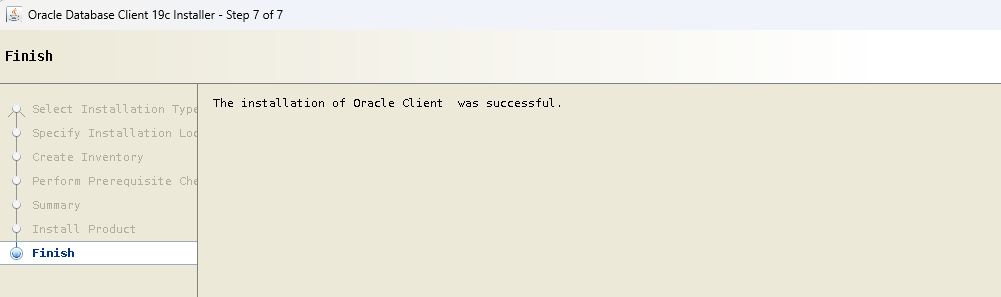
That completes the Client Installation. the below will be displayed.


Client Install success


Optional Steps:

After the successful installation the environment variables can be added to the bash profile for oracle user, so that it automatically assigned after each fresh login to the server. The path can be changed according to the environment and business standard that is followed by the enterprise. 

Example:

echo "ORACLE_HOME=/opt/app/oracle/product/19.0.0/client_1; export ORACLE_HOME" >> ~/.bash_profile

echo "LD_LIBRARY_PATH=\$ORACLE_HOME/lib; export LD_LIBRARY_PATH" >> ~/.bash_profile

echo "TNS_ADMIN=\$ORACLE_HOME/network/admin; export TNS_ADMIN" >> ~/.bash_profile

echo "PATH=\$PATH:\$ORACLE_HOME/bin; export PATH" >> ~/.bash_profile

cat ~/.bash_profile


Thanks for reading. Hope this helps you. Best Wishes!!

February 10, 2025

How to check Oracle Database Size

Check the size of the Database:

Execute the below query as sys/ system or user with DBA privilege. 

col "Database Size" format a20
col "Free space" format a20
col "Used space" format a20


select round(sum(used.bytes) / 1024 / 1024 / 1024 ) || ' GB' "Database Size"
, round(sum(used.bytes) / 1024 / 1024 / 1024 ) -
round(free.p / 1024 / 1024 / 1024) || ' GB' "Used space"
, round(free.p / 1024 / 1024 / 1024) || ' GB' "Free space"
from (select bytes
from v$datafile
union all
select bytes
from v$tempfile
union all
select bytes
from v$log) used
, (select sum(bytes) as p
from dba_free_space) free
group by free.p
/


Sample Output:


Database Size        Used space           Free space
-------------------- -------------------- --------------------
500 GB               462 GB               38 GB


If you find this useful, please leave a comment. If you need the query to check for the size specific to any schema / Tables/ Please keep following the next posts.


Best Wishes!!

February 04, 2025

Patching: Apply Oracle Database Patch on Linux/Unix host

 How to apply Oracle Database Patches in Linux?

This guide explains how to apply database patches into oracle database and oracle home running on Unix/Linux/ Aix etc.
First, we need to download the required patch from oracle support or metalink. 
Then ftp/scp the patch in a shared path on the server. 

Login to the server:

Setup environment variables.


ORACLE_SID=dev
ORACLE_HOME=/u01/app/oracle
ORACLE_BASE=/u01/app
PATCH_TOP=<Temporary location where the patch is staged>
PATH=$ORACLE_HOME/OPatch:$PATCH_TOP:$PATH:.

Note: Setup the PATH Variable to point to OPatch directory and the Patch directory where the patch is staged.

January 21, 2025

Oracle Critical Patch Update(CPU) for January 2025

Oracle CPU January 2025 Patches

Oracle has released the CPU patches for January 2025 and all the details can be found on Oracle Technical resources site. New release Version is: 19.26.0.0.250121


I will be shortlisting the patches required for Grid Installation, Oracle Databases 19c, OJVM and OEM.


Combo OJVM with Oracle Database 19c:

Combo OJVM Release Update 19.26.0.0.250121 and Database Release Update 19.26.0.0.250121 Patch 37262172 for UNIX

Combo OJVM with Oracle GI 19c:

Combo OJVM Release Update 19.26.0.0.250121 and GI Release Update 19.26.0.0.250121 Patch 37262208, or


Oracle Home and Grid Home Individual Patches:

Database Release Update 19.26.0.0.250121 Patch 37260974 for UNIX, or

GI Release Update 19.26.0.0.250121 Patch 37257886,


Oracle JavaVM Component Database PSU (OJVM PSU) Patches:

OJVM Release Update 19.26.0.0.250121 Patch 37102264 for all platforms


OEM Patches:

OEM base patch and agent patch is yet to release on 31-Jan-2025. For now the DB patch can be applied in the repository database.


Note: All the Combo patches are not released, those will be released by 05-February-2025


References:

January 08, 2025

ORA-01940: cannot drop a user that is currently connected

Issue with drop user in Oracle


While Dropping a user if the drop user command is throwing error like:

ORA-01940: cannot drop a user that is currently connected

Follow the below steps:

select 'alter system kill session '''||sid||','||serial#||''' immediate;' "SQL Statement" from v$session where username=UPPER('&username');

SQL Statement

--------------------------------------------------------

alter system kill session '101,265842' immediate;

Execute the alter statement to kill the active session.

alter system kill session '101,265842' immediate;

System altered.

Now the drop user will work:

drop user <username> cascade;

Note: cascade option drops all the dependent objects under the schema.


December 31, 2024

Gather Statistics


Oracle Gather Stat 


Gather Table, Index and Schema Statistics


DBMS_STATS.GATHER_TABLE_STATS is used to gather stats for a single table

EXEC DBMS_STATS.gather_table_stats('HR','EMPLOYEES');

EXEC DBMS_STATS.gather_table_stats('HR','EMPLOYEES',cascade=>TRUE);

( Note: Cascade gathers Index stats associated with the table )

How to check RMAN progress?

Check RMAN job progress 


The below query can be used to identify the progress of any rman job. Either backup or restore.


alter session set nls_date_format='DD-MON-YYYY HH24:MI:SS';

set line 200;
set pages 500;
set long 5000;

select sl.sid, sl.opname,
to_char(100*(sofar/totalwork), '990.9')||'%' pct_done,
sysdate+(TIME_REMAINING/60/60/24) done_by
from v$session_longops sl, v$session s
where sl.sid = s.sid
and sl.serial# = s.serial#
and sl.sid in (select sid from v$session where module like 'backup%' or module like 'restore%' or module like 'rman%')
and sofar != totalwork
and totalwork > 0
/


December 06, 2024

Failed to start ASMB (connection failed) state=0x1

Issue with Oracle ASM

OPatch Failed with error code 73

Oracle OPatch  Error


Error:

Oracle Home       : <ORACLE_HOME> Path 

Central Inventory : The inventory that is being used by this opatch session

   from           : The inventory that is stored in the Oracle Home

OPatch version    : 12.2.0.1.44

OUI version       : 12.2.0.7.0

Log file location : /u01/oracle/product/19.3.0/cfgtoollogs/opatch/opatch<date>.log


OPatchSession cannot load inventory for the given Oracle Home <oracle_home>. Possible causes are:
   No read or write permission to ORACLE_HOME/.patch_storage
   Central Inventory is locked by another OUI instance
   No read permission to Central Inventory
   The lock file exists in ORACLE_HOME/.patch_storage
   The Oracle Home does not exist in Central Inventory
UtilSession failed: OPatch failed to locate Central Inventory.
Possible causes are:
    The Central Inventory is corrupted
    The oraInst.loc file specified is not valid.


This is because, sometime the /etc/oraInst.loc is pointing to the ora inventory in a temp location which the $ORACLE_HOME/oraInst.loc is not aware.

cat /etc/oraInst.loc
cat $ORACLE_HOME/oraInst.loc

check if both the files are pointing to the same location. if not, take a backup of the file and update the central inventory in $ORACLE_HOME/oraInst.loc.

cp -p $ORACLE_HOME/oraInst.loc $ORACLE_HOME/oraInst.loc.old
Modify the file accordingly for parameter inventory_loc=<Full PATH of the inventory, which can be copied from /etc/oraInst.loc>


Note: One more observation on the file permission, if you are running the grid with different usernames, the same group and sharing the same inventory, make sure, the files under /u01/oraInventory/ContentsXML have 644 permissions. So that while doing patching with Oracle users, it can modify those XML files.

Hope this helps resolve the error, happy patching!!


Best Wishes!!


December 05, 2024

OPatch Session Hung Forever | CUP_LOG: Found poh CUP XXXXXX is a subset of other poh CUP: XXXXX

Performance Issue with OPatch


Opatch Hung forever

CUP_LOG: Found poh CUP XXXXXX is a subset of other poh CUP: XXXXX


If you ever face issues with opatch utility is taking long time to run the prerequisite check and in the log you see the below line.


CUP_LOG: Found poh CUP XXXXXX is a subset of other poh CUP: XXXXX


It is time to cleanup some inactive patches from opatch inventory, to do that please follow the below instructions.


cd $ORACLE_HOME/OPatch

--This will list the inactive patches

./opatch util listorderedinactivepatches

--This will remove the inactive patches

./opatch util deleteinactivepatches


This will take some time depending on how many old inactive patches is present in the inventory.


Reference:

OPatch 12.2.0.1.37+ Introduces a New Feature to Delete Inactive Patches in the ORACLE_HOME/.patch_storage Directory (Doc ID 2942102.1)


December 17, 2021

Find Concurrent Program Run History from backend

Query to find concurrent program run history and status


SELECT f.request_id,
         pt.user_concurrent_program_name
             user_conc_program_name,
         f.actual_start_date
             start_on,
         f.actual_completion_date
             end_on,
         p.concurrent_program_name
             concurrent_program_name,
         DECODE (f.phase_code,
                 'R', 'RUNNING',
                 'C', 'COMPLETED',
                 f.phase_code)
             phase,
         DECODE (f.status_code,  'C', 'NORMAL',  'E', 'ERROR',  f.status_code)
             Status,
         f.requested_by,
         fu.user_id,
         fu.user_name
    FROM apps.fnd_concurrent_programs   p,
         apps.fnd_concurrent_programs_tl pt,
         apps.fnd_concurrent_requests   f,
         apps.fnd_user                  fu
   WHERE     f.concurrent_program_id = p.concurrent_program_id
         AND f.program_application_id = p.application_id
         AND f.concurrent_program_id = pt.concurrent_program_id
         AND f.program_application_id = pt.application_id
         AND pt.language = USERENV ('lang')
         AND f.actual_start_date IS NOT NULL
         AND f.actual_start_date >
             TO_DATE ('15-DEC-2021 00:00:00', 'DD-MON-YYYY HH24:MI:SS')
         AND f.actual_completion_date <
             TO_DATE ('17-DEC-2021 23:59:59', 'DD-MON-YYYY HH24:MI:SS')
         AND f.requested_by = fu.user_id
         AND pt.USER_CONCURRENT_PROGRAM_NAME = '&User_concurrent_program_name'
--AND fu.user_name = '&user_name'
ORDER BY f.actual_start_date ASC; 

##Change the date accordingly.

December 15, 2021

Temp Tablespace Usage

Oracle Temp Tablespace usage


Check for Temp tablespace usage


set lin 200;
col file_name for a75;
col autoextensible for a15;

select file_name,tablespace_name,sum(bytes)/1024/1024 as FILE_SIZE,sum(maxbytes)/1024/1024 as MAX_SIZE,autoextensible from dba_temp_files
where tablespace_name ='TEMP' group by file_name,tablespace_name,autoextensible order by file_name;


Data file usage of a tablespace

Oracle Tablespaces 

Check Data File Size in any given Tablespace (Dynamic) :

set lin 200;
col file_name for a75;
col autoextensible for a15;

select file_name,tablespace_name,sum(bytes)/1024/1024 "FILE_SIZE(MB)",sum(maxbytes)/1024/1024 as MAX_SIZE,autoextensible from dba_data_files
where tablespace_name ='&tablespace_name' group by file_name,tablespace_name,autoextensible order by file_name;

December 09, 2021

Query to find Tablespace utilization in Oracle Database

Oracle Tablespace Utilization

Find the tablespace utilization on Oracle Database (10g,11g,12c,19c)


column file_name format a45
column tablespace_name format a10
col tablespace_name for a40
set verify off
set pages 3000
set line 3000


SELECT  dts.tablespace_name, 

NVL(ddf.bytes / 1024 / 1024, 0) avail,

NVL(ddf.bytes - NVL(dfs.bytes, 0), 0)/1024/1024 used,
NVL(dfs.bytes / 1024 / 1024, 0) free,
TO_CHAR(NVL((ddf.bytes - NVL(dfs.bytes, 0)) / ddf.bytes * 100, 0), '990.00') "Used %" ,
TO_CHAR(NVL((ddf.bytes - NVL(ddf.bytes - NVL(dfs.bytes, 0), 0)) / ddf.bytes* 100, 0), '990.00') free_pct,
decode(sign((NVL(ddf.bytes - NVL(dfs.bytes, 0), 0)/1024/1024)/0.90 - NVL(ddf.bytes/1024/1024, 0)),-1,0,
(NVL(ddf.bytes - NVL(dfs.bytes, 0), 0)/1024/1024)/0.90 - NVL(ddf.bytes / 1024 / 1024, 0))  "Required MB" FROM
sys.dba_tablespaces dts,
(select tablespace_name, sum(bytes) bytes from dba_data_files group by tablespace_name) ddf,
(select tablespace_name, sum(bytes) bytes from dba_free_space group by tablespace_name) dfs
WHERE
dts.tablespace_name = ddf.tablespace_name(+)
AND dts.tablespace_name = dfs.tablespace_name(+)
order by free_pct;

Best Wishes!!

November 21, 2021

Create Oracle Database User

Oracle Database User Management

This is the simplest task for a Database Administrator. 

Login to sqlplus session from your OS(Windows/Linux/AIX) using sysdba / a user who has create user privilege. 

sqlplus / as sysdba

alter user <username> identified by <password>;

this will create a user with default tablespace and profile. Depending on the organization's policy and user's requirement you might need to mention few other options in the query. Those are advanced options you can explore more on my advance create user query.

Now user needs some privileges to connect to the database and do some transactions or query any tables.

CONNECT - this is the Oracle-defined default privilege for any user to be able to connect to the database.

grant connect to <username>;

alternatively, grant create session to <username>;  will do the same.

Now, for the user to be able to query any table in the db, one basic privilege is required.

grant select any table to <username>;

This will create a db user in Oracle. 

To see the user is created properly you can validate with below query.

select * from dba_users where username='<username>';

The dba_users is a data dictionary view which eventually being created from all_users. To know more about all_users and dba_users column properties stay tuned!!


Best Wishes!!

Recent Post

Oracle Memory usage Queries

Some Important Oracle database Memory management queries. SGA usage by Oracle Instance: select  round(sum(bytes)/1024/1024,2)||' MB'...